Chris, fleet manager at Midwest Transport, stared at his screen filled with trip logs and receipts. His quarterly IFTA filing was due in 48 hours, and he'd already spent 12 hours manually calculating state-by-state mileage for his 15-truck fleet. One calculation error last quarter had cost the company $3,200 in penalties. His coffee had gone cold hours ago, and his wife had texted twice about missing dinner.
That's when Chris discovered the IFTA Distance Calculator for Excel. A simple Google search for "IFTA calculator Google Maps API integration Excel" led him to a tool that would transform his quarterly nightmare into a 30-minute task.
How the IFTA Distance Calculator Helped Chris
- Chris got his evenings back by reducing IFTA calculations from 16 hours to just 30 minutes with automated state mileage breakdowns.
- Chris saved his company $3,200 in potential penalties by eliminating manual calculation errors.
- Chris processed his entire fleet's quarterly mileage with one click, generating state-by-state reports instantly.
- Chris's CFO approved the purchase immediately after seeing the ROI—one avoided penalty pays for the IFTA Distance Calculator 33 times over.
- Chris now confidently handles audits with precise, Google Maps-verified mileage data.
- Chris felt relief knowing he could call Vinnie directly at 801-243-8350 for personalized support, unlike subscription services with offshore call centers.
How Does It Work?
The IFTA Distance Calculator transforms complex state mileage calculations into a simple three-step process:
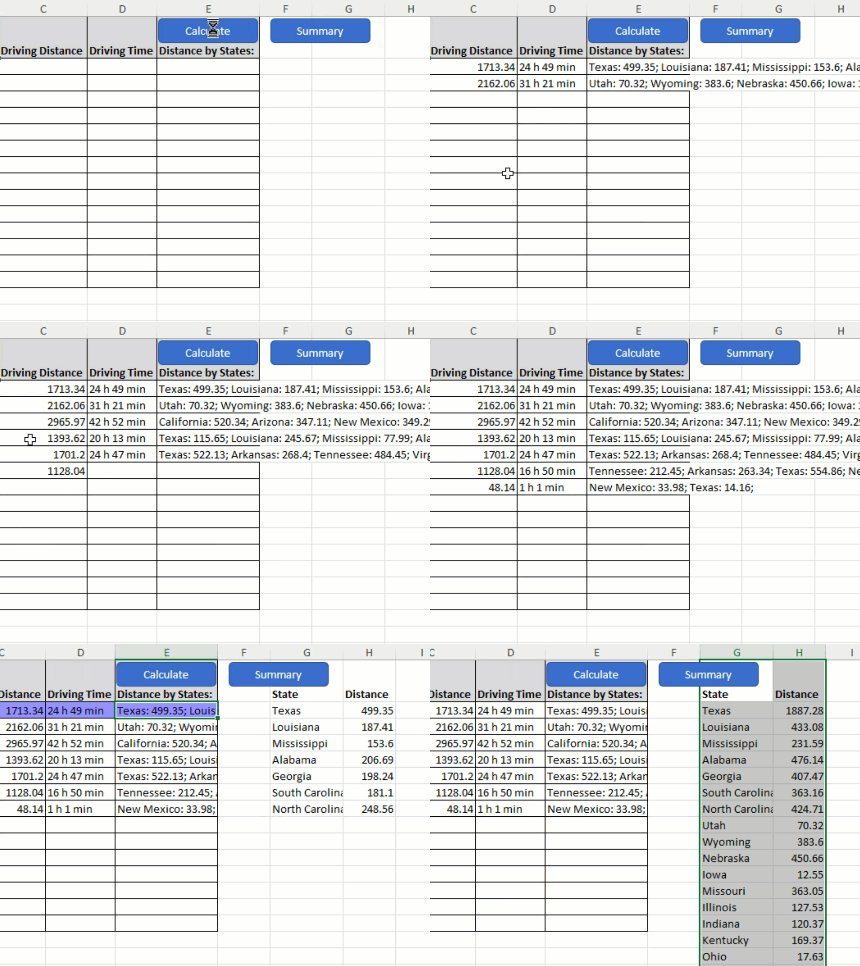
Step 1: Paste Your Trip Data
Simply copy your origin and destination addresses, or route waypoints, directly into the Excel spreadsheet. The tool accepts addresses, zip codes, or city/state combinations.

Step 2: Click "Calculate"
With one click, the tool connects to Google Maps API and processes your entire fleet's routes, automatically determining which states were crossed and the exact mileage in each.

Step 3: That's It! - Watch the Magic Happen
Within seconds, see precise state-by-state mileage breakdowns appear in your spreadsheet, ready for IFTA reporting. Export directly to your tax software or print for filing.

Features of the IFTA Distance Calculator
- Google Maps API Integration: Leverages real-time Google Maps data for accurate, up-to-date routing that accounts for actual truck routes, not just straight-line distances with the IFTA Distance Calculator.
- Batch Processing: Calculate mileage for 1,000+ trips simultaneously, processing an entire quarter's worth of data in minutes.
- State Border Detection: Automatically identifies every state border crossing and allocates precise mileage to each jurisdiction.
- Excel Native: Works directly in Excel without additional software installation—if you can copy and paste, you can use the IFTA Distance Calculator.
Frequently Asked Questions
Is it difficult to set up the Google Maps API?
Not at all! It takes about 5 minutes following our step-by-step video tutorial. You don't need any coding knowledge—if you can create a Google account, you can set up the API. Plus, Google provides $200 in free credits monthly (about 40,000 calculations).
How does this compare to manual IFTA calculation methods?
Manual calculation using paper maps or basic mileage charts takes 30-45 minutes per trip and is prone to errors. The IFTA Distance Calculator processes hundreds of trips in seconds with Google Maps accuracy, eliminating human error.
What if I need help after purchasing?
Unlike subscription services with chat bots, you get direct access to Vinnie, the creator. Call 801-243-8350 for real human support, or use the live chat for immediate assistance. We even offer Zoom screen sharing for setup help.
Can it handle Canadian provinces for IFTA?
Yes! The tool works with all IFTA jurisdictions including Canadian provinces. It accurately calculates kilometers for Canadian portions and converts to miles for US states automatically.
Why is this better than online IFTA calculators?
Online calculators require monthly subscriptions ($49-199/month), have trip limits, and your data lives on someone else's server. Our Excel tool is a one-time purchase, processes unlimited trips, and keeps your data private on your computer.
Does it work with electronic logging devices (ELD)?
Yes! Export your ELD data to CSV format, paste it into our tool, and calculate IFTA mileage instantly. The tool accepts any address format your ELD outputs.
What about toll roads and restricted routes?
The Google Maps API integration intelligently routes trucks on appropriate roads, avoiding restricted routes. For toll calculations, consider our Driving Distance Calculator with Toll Cost for comprehensive trip costing.
Stop wasting 16+ hours every quarter on manual IFTA calculations. Join over 7,000 trucking professionals who've eliminated IFTA headaches with our one-time purchase solution.
With accuracy guaranteed by Google Maps API and personal support from Vinnie himself, you'll wonder why you waited so long to automate your IFTA reporting.
Get Your IFTA Distance Calculator Now - Save 16 Hours Every Quarter